TSD · Expiry dates
Expiry date tracking for grocery stores
Yetar tracks expiry dates on the sales floor with an ordinary phone used as a handheld terminal (TSD). A staff member scans a product and enters the shelf quantity and the nearest expiry date. Yetar compares the quantity with stock in 1C, uses daily sales to check whether the product will sell before it expires, and colour-codes risky items for the manager. Nothing is written to 1C.
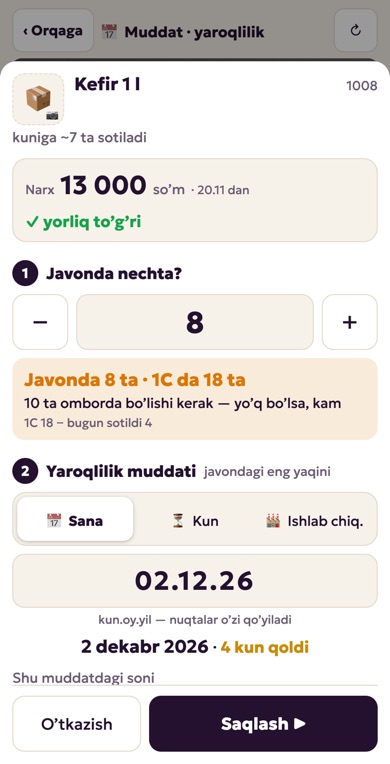
How staff record an expiry date on the floor: 4 steps
Scan the product
The staff member points the phone camera at the barcode. The screen shows the name, the retail price from 1C and the sales rate, for example “Kefir 1 l · about 7 sold per day”. Here they also confirm whether the shelf price label is right; if it is not, a new label is queued for printing.
Count the shelf
The staff member answers “How many on the shelf?”. Yetar compares the number with 1C: if the shelf holds 8 and 1C shows 18, the screen says 10 should be in the stockroom, and if they are not there, stock is short.
Enter the nearest date
The date can be entered three ways: as a date, as days remaining, or as a production date plus shelf life. Yetar spells out the result, such as “2 December 2026 · 4 days left”.
Save the entry
On “Save” the entry joins the store list and gets a colour. The manager sees it in the panel.
What expired stock costs a store
Expired stock is lost money. It cannot be sold, it is usually written off, and a shopper who finds an expired product on the shelf trusts the store less. Most stores notice the date late, when the product has already expired.
Yetar turns expiry checks into a daily routine: a staff member walks the floor, scans products and records the nearest date. The manager sees in advance what will not sell in time. That leaves time to cut the price, return the goods to the supplier or move them to a more visible spot.
In the last 14 days (15–28.11.2026), staff at the 18 stores connected to Yetar entered a combined 2 929 expiry dates from their phones.
Will it sell in time? How the colour is set
Every entry gets a colour. A product that has expired or expires today is red. If the shelf quantity will sell before the date at the current daily sales rate, the product is green and the manager is not disturbed. Daily sales are averaged over the last 14 days.
For a product that will not sell in time, the warning point depends on the product type. The type comes from the total shelf life or from the product type in the 1C card; if neither is known, the product is treated as medium shelf life.
- Perishable (total shelf life up to 14 days): orange at 3 days left, yellow at 7 days.
- Medium shelf life (15–90 days): orange at 7 days left, yellow at 14 days.
- Long shelf life (over 90 days): orange at 30 days left, yellow at 60 days. This leaves time to return the goods to the supplier.
What the manager sees in the panel
The owner or manager opens the expiry section of the TSD panel. At the top is today’s summary: how many items are red, orange and yellow, and the cost value of the stock at risk. The list is grouped by colour and can be filtered by location: sales floor, fridges, outdoor area, stockroom. Each entry shows:
- the product name, 1C code and shelf number;
- the nearest expiry date, days left and the quantity with that date;
- who entered it and when;
- daily sales and a “will sell” or “will not sell” mark;
- the value at cost and a photo of the date on the pack, if one was taken.
Who decides what happens to near-expiry goods
When a product is taken off the shelf or sells out, the staff member closes the entry on the phone, marking it as done or as no longer on the floor. Entries closed during the day are listed separately.
In Yetar Pro (the full panel), expired items and items that will not sell in time go to the manager’s queue automatically. The manager decides: a discount, a return to the supplier or a write-off. The staff member sees the decision on the TSD card and closes it once done. A store that uses only the TSD has no such queue: the manager reviews the list in the panel and chooses the action.
Expiry tracking and 1C: what is read, what is written
| Expiry dates | Not written to 1C. Date, quantity, shelf and photo are stored in Yetar. |
|---|---|
| 1C stock | Read only: to compare with the shelf count. |
| 1C retail price | Read only: to show the price and check the shelf label. |
| Sales history | Read only: the average daily sales over the last 14 days. |
| 1C product cards and documents | Unchanged. There is no need to switch on batch or series tracking in 1C. |
Expiry date tracking: questions
Are expiry dates written to 1C?
No. The date, quantity and shelf are stored in Yetar, and 1C product cards and documents stay as they are. Yetar only reads stock, retail prices and sales from 1C, to check the shelf count and work out whether a product will sell in time. For other tasks, such as goods receiving and new product cards, Yetar writes only unposted drafts to 1C.
Do staff have to enter the expiry date when receiving goods?
No. Goods receiving does not ask for expiry dates, so it is not slowed down. Dates are entered on the sales floor: staff scan a product while stocking the shelf or walking the aisles and record the nearest date. The shelf can differ from what arrived, so it is the shelf that gets checked.
What if a product has several expiry dates?
Each date is entered separately with its own quantity, for example 5 units to 02.12 and 3 units to 10.12. The phone shows the dates already recorded for that product. If the total across dates exceeds the shelf count, Yetar warns the user. Entering the same date again replaces the quantity rather than adding to it.
What if the pack shows only a production date?
Enter the production date and the shelf life in days or months, and Yetar calculates the expiry date. If you know how many days are left, entering that number is enough. If a date does not exist or is too far ahead, the phone asks you to check it. You can also photograph the date on the pack.
Why not track expiry dates in 1C itself?
Many 1C configurations track expiry through product series: the feature has to be switched on, and a series entered on every receipt. A list of goods close to expiry often needs a separate report or add-on. Yetar does not change 1C settings or require series tracking: the date is recorded at the shelf.
Do we need a dedicated handheld terminal?
No. An ordinary smartphone with a camera is enough: the camera reads the barcode, and the staff member enters the quantity and date. The phone TSD opens in a browser and can be added to the home screen. Each staff member signs in with their own login, so the list shows who entered each date and when.
Who decides what to do with near-expiry goods?
A person does. In a store that uses only the TSD, the manager reviews the colour-coded list in the panel and chooses the action. In Yetar Pro, near-expiry items that will not sell in time go to the manager’s queue automatically: the manager picks a discount, a return to the supplier or a write-off, and the staff member sees the decision on the phone.
Do stores actually use it?
Yes. In the last 14 days (15–28.11.2026), staff at the 18 stores connected to Yetar entered a combined 2 929 expiry dates from their phones. The figure is a total across all stores, published without store names.
More of what Yetar does
- Goods receivingReceive goods with a phone camera. Yetar writes each receipt to 1C as an unposted draft and creates product cards for items 1C does not have yet.
- Price labelsScan a product by phone, see the 1C retail price and stock, and print a shelf price label or barcode label on the store printer. Nothing is written to 1C.
- 1C integrationHow Yetar reads 1C data and writes unposted drafts: goods receipts, new product cards and stock counts. Dalion, Shtrih-M and a per-system support matrix.
- FeaturesThe TSD part runs in every store. The Pro layer adds ordering and management on request.
Get started
See expiry tracking in a demo
Book a demo: we will show expiry entry on the floor and the manager’s list in a sample store, and explain how Yetar connects to your 1C.
- The demo is free
- 1C and your software stay
- Live answers to your questions
Or contact us directly: