TSD · Receiving → 1C
Goods receiving on a phone for 1C
Yetar turns an ordinary smartphone into a handheld terminal (TSD) for 1C. A storekeeper picks the supplier, scans goods with the camera and checks the quantities. When receiving is closed, Yetar creates an unposted goods receipt draft («Приходная накладная») in 1C and opens a new card for any product 1C does not know. The store’s 1C operator checks the document and posts it.
How goods receiving works on a phone: 5 steps
Open a receipt
Pick an expected delivery, or open a new receipt for goods that arrived without an order. The supplier (counterparty) is chosen from the 1C list by name or code.
Scan with the camera
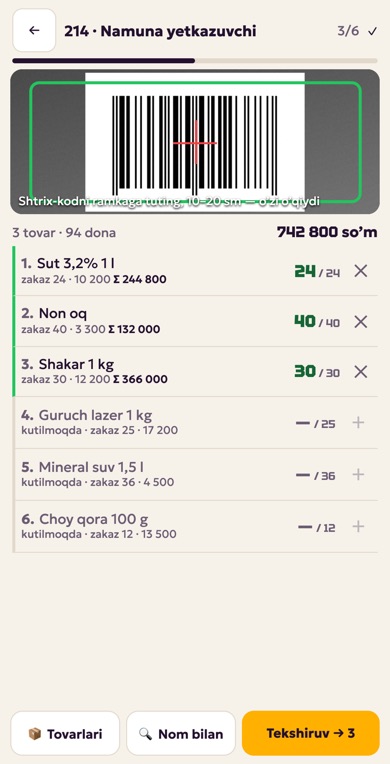
Hold the barcode in the frame 10–20 cm away and the phone reads it. Each scan adds one unit; tap a line to correct the quantity with −1 / +1, by the box or as an exact number.
Check the differences
When goods are received against an order, each line shows the ordered and received quantities side by side. The check screen gathers shortages, surpluses and items outside the order, and every difference gets a reason.
Photograph the invoice
A photo of the supplier’s invoice is attached to the receipt and kept in Yetar as proof of quantities and prices. If there is no photo, the comment on the 1C document says so.
Close and send to 1C
Close the receipt and press the send-to-1C button. An unposted receipt draft usually appears in 1C within a few minutes, and the phone shows its status.
What document lands in 1C
Yetar talks to 1C through a small program installed on the store’s server. The program collects the next document from Yetar and creates a goods receipt («Приходная накладная») in 1C as an unposted draft. 1C assigns the document number itself.
The draft carries the counterparty, its main contract and the warehouse linked to the store. Each line has the product, unit, quantity and price. The quantity is what was actually scanned, never what the paper says. The storekeeper types the price from the invoice; if a price is missing, Yetar uses the supplier’s last receipt price and flags it in the comment.
One receipt, one document: pressing the button again does not create a copy in 1C. If the 1C operator has already keyed in the same invoice, Yetar does not create a second document. It links the receipt to the existing one or flags a possible duplicate. The flags in the comment tell the operator what to check:
- «ЦЕНЫ ПРОВЕРИТЬ» (check prices) — some prices were not entered on the phone.
- «ВЕС ПРОВЕРИТЬ» (check weight) — goods sold by weight; compare with the invoice.
- «НЕ ПО НАКЛАДНОЙ» (not as invoiced) — the quantity differs from the invoice on purpose, for example a short delivery or a return.
- «ВОЗМОЖЕН ДУБЛЬ» (possible duplicate) — a similar receipt for the same day already exists in 1C.
- «Принял: …» (received by) — the employee who closed the receipt.
What happens when a scanned product is not in 1C
If the barcode is not in the 1C catalog, the phone asks which product it is. If the product already exists in 1C under another barcode, the storekeeper picks that card and confirms the choice. The new barcode is added to the existing card; its name, group and unit stay the same.
If the product is genuinely new, the storekeeper photographs its front and its label. Yetar reads the name from the label and, based on similar products in 1C, suggests the group, the unit (piece or kg) and the VAT rate. Where the store has it switched on, Yetar also picks the MXIK (IKPU) fiscal product code and package code from the national tax catalog and similar cards.
Yetar then creates a new product card with its barcode in 1C. The receipt waits until the cards appear in 1C and is then sent on its own, so the operator does not pick products by hand. If a card is not created in time, the line goes into the document with an empty product field, the comment flags it, and the 1C operator picks the product.
Who does what: storekeeper, 1C operator, owner
Every employee signs in to Yetar with their own login, so each receipt records who received the goods.
If the storekeeper does not remember the supplier, they scan a product on the supplier-by-product screen: Yetar looks at the receipt history in 1C and shows which suppliers delivered it.
- Storekeeper — opens the receipt, chooses the counterparty, scans goods, marks differences, photographs the invoice and closes the receipt. For a new product, takes two photos.
- 1C operator — opens the draft in 1C, reads the flags in the comment, checks prices and the contract against the invoice and posts the document. Never retypes the invoice.
- Owner — gives staff their logins and decides who works in which section: receiving, price labels, expiry dates, stock counts. Every receipt in 1C carries the name of the person who received it.
Goods received through Yetar in the last 14 days
Figures for the last 14 days (15–28.11.2026) across the 18 stores that use Yetar:
- 24 904 receiving lines scanned on phones.
- 1 621 goods receipt documents written to 1C as drafts.
- 1 422 new product cards created in 1C.
What appears in 1C
| Goods receipt («Приходная накладная») | Unposted draft: counterparty, main contract, warehouse, products, quantities and prices. 1C assigns the number; the 1C operator posts it. |
|---|---|
| Document comment | Check flags («ЦЕНЫ ПРОВЕРИТЬ», «ВЕС ПРОВЕРИТЬ», «ВОЗМОЖЕН ДУБЛЬ») and the receiver: «Принял: …». |
| New product card | Name, group, unit, VAT rate and barcode; MXIK and package code where enabled. |
| New barcode on an existing product | Added to the card the storekeeper confirmed; its name, group and unit do not change. |
| Posted documents | Yetar does not edit them, delete them or cancel their posting. |
Questions about goods receiving
Does a store need a dedicated TSD device for 1C, or is a phone enough?
A phone is enough. Yetar opens in the phone’s browser and can be added to the home screen as an app, so no separate terminal is needed. On Android a built-in reader decodes barcodes quickly. iPhones work too but read glossy barcodes more slowly. Each employee has their own login, and two phones can receive the same delivery together. A store that already has button handhelds can run Yetar in their browser.
How does a phone receipt look in 1C, and who posts it?
It appears in the 1C list of goods receipts as an unposted «Приходная накладная» with the counterparty, warehouse, products, quantities and prices. The comment holds the check flags and the receiver’s name. The 1C operator checks and posts the document. Yetar never touches posted documents and does not replace 1C: the accounting stays in 1C.
What if the 1C operator has already entered the invoice by hand?
Yetar avoids creating a second document. If 1C already holds a receipt from the same counterparty on the same day with almost the same products, the receipt is linked to it and no new draft is created. The phone may also ask whether it is the same invoice. With a weak match a new draft is written, but its comment says «ВОЗМОЖЕН ДУБЛЬ» with the number of the similar document.
What if the camera does not read a barcode?
Hold the barcode straight inside the frame, 10–20 cm away. On an iPhone hold it a little farther, 20–30 cm, and tilt the phone slightly to avoid glare, because glossy film cuts across the bars. If it still does not read, type the barcode digits by hand or find the product by name.
Where does the price on the receipt come from?
The storekeeper types the price from the supplier’s invoice on the phone. For lines without a price, Yetar uses the supplier’s last receipt price and writes «ЦЕНЫ ПРОВЕРИТЬ» in the 1C comment. A line with no price found at all goes without a price. The 1C operator compares prices with the invoice, fills in the missing ones and only then posts the document.
Which 1C configurations does Yetar work with?
Stores connected today run configurations on the 1C:Enterprise 8.3 platform: Dalion UM PRO 1.2 and 2.0, Dalion TREND 3.0 and Shtrih-M Trade Enterprise 5.2. In all of them a receipt is written as a «Приходная накладная». Other configurations are checked during a demo. The Yetar team does the connection: a small program goes on the store’s server, and 1C gets a separate user for Yetar.
How are price labels printed right after receiving?
In the invoice labels section, open today’s receipt and select the products. A barcode label or a shelf price tag comes out of the store’s label printer, with the price taken from 1C. For a single product on the shop floor, scan it in the price label section and press print.
What if fewer or more goods arrive than were ordered?
When the order was placed through Yetar, the receiving screen shows the difference at once: a shortage, a surplus or an item outside the order. Each difference gets a reason: the rest comes later, short delivery, damaged goods or a return. 1C receives the quantity actually scanned, and the comment shows how it differs from the invoice. Goods delivered later are received as a separate receipt.
More of what Yetar does
- Price labelsScan a product by phone, see the 1C retail price and stock, and print a shelf price label or barcode label on the store printer. Nothing is written to 1C.
- Expiry trackingStaff scan products on a phone and enter the nearest expiry date. Yetar checks the shelf against 1C stock and flags what will not sell before expiry.
- 1C integrationHow Yetar reads 1C data and writes unposted drafts: goods receipts, new product cards and stock counts. Dalion, Shtrih-M and a per-system support matrix.
- FeaturesThe TSD part runs in every store. The Pro layer adds ordering and management on request.
Get started
See goods receiving in a demo
In a short demo we show receiving on a phone and the draft that appears in 1C. We also check whether your 1C configuration is supported.
- The demo is free
- 1C and your software stay
- Live answers to your questions
Or contact us directly: